
Lifeline
Lifeline Assistance
Lifeline is a governmental assistance program that provides a monthly credit to qualifying customers with either telephone, internet, or bundled internet and voice services. Eligible households may apply the monthly Lifeline credit to either internet service or phone service but not both (unless bundled service plan). Qualifying broadband service refers to a speed of 25/3 Mbps.
Federal Lifeline Funding
- If you receive Lifeline for phone service, you can get the benefit for one mobile phone or one home phone, but not both. Customer receives one $5.25 credit.
- If you receive Lifeline for internet service, you can get the benefit for your mobile phone or home connection, but not both. Customer receives only one $9.25 credit.
- If you receive Lifeline for bundled phone and internet service, you can get the $9.25 credit one time per month, but not for each service.
- Qualifying Tribal lands receive a monthly discount of up to $34.25 on phone, internet, or bundled services.
Missouri Lifeline Funding
Missouri Public Service Commission provides additional monthly discounts for eligible households using the following with a max combined total of $24.00.*
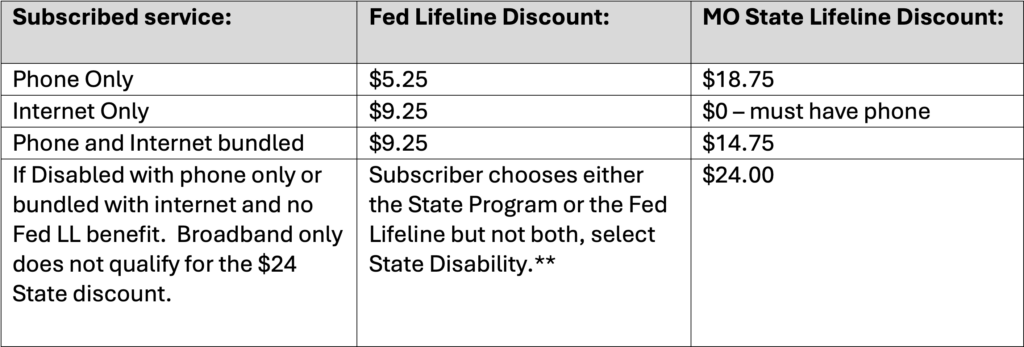
*please allow 30 days for discount to appear on next invoice.
**Missouri Disabled Program provides a monthly discount of $24 to qualifying landline voice or voice plus broadband bundled, but not broadband only. Consumers must choose Fed Lifeline or Disabled program but not both.
HOW DO I APPLY FOR LIFELINE?
Three Ways to Apply for Lifeline:
1. Online using the USAC Lifeline Portal– Apply Now. The first step is to get qualified by completing the online application on the USAC Lifeline Portal. After applying and receiving approval from USAC, contact lifeline@corp.socket.net to be enrolled. Please have your Qualification ID# ready.
2. Contact your Phone or Internet Company lifeline@corp.socket.net. After you apply and receive approval (Qualification ID #) from USAC, Socket will enroll you in the Lifeline Program in the NLAD. Step Two enrolls the customer in the NLAD. Enroll Now. Please allow 30 days for the discount to appear on your bill.
3. By Mail. Print out an application and send your completed application to the address below. After you receive your Qualification ID#, contact lifeline@corp.socket.net to be enrolled.
Lifeline Application Form –
Lifeline Support Center
P. O. Box 1000
Horseheads, NY 14845
If you have a disability and need assistance with applying, contact the Lifeline Support Center at 1-800-234-9473. The Lifeline Support Center can mail you an application if needed.
HOW DO I TRANSFER MY LIFELINE BENEFIT FROM MY OLD PROVIDER TO SOCKET?
Prior to Socket initiating a Lifeline benefit transfer in NLAD, Socket must obtain the consent of the subscriber and obtain proper documentation of consent. Please click Transfer My Lifeline Benefits. Send the completed form to lifeline@corp.socket.net.
FCC Lifeline Rules FAQs
What do I need to fill in on the application?
It is important that you fill out the application completely and accurately to ensure there are no delays in being approved for the Lifeline program. Please review the instructions on the application carefully. Required:
- Customer Name
- Customer Service Address
- City, State, Zip
- Must note if your address is permanent or temporary
- Customer Telephone Number
- Social Security Number (last 4 digits only)
- Date of Birth (mm/dd/yyyy)
- Must check qualifying program or income; if income, must provide # of persons in household
- Must provide proof of program participation or income level
- Must check that you have read and agree to the list of certifications
- Signature
- Date
How do I qualify?
Here are the ways you can qualify for Lifeline: https://www.lifelinesupport.org/do-i-qualify/
How do I submit the application?
Missouri customers should complete the Lifeline application using the self-enrollment portal: https://getinternet.gov/apply?id=nv_home&ln=RW5nbGlzaA%3D%3D
And click on GET STARTED. Once approved by USAC, send the confirmation email with the Application ID# to lifeline@corp.socket.net.
What proof do I need to bring?
If you qualify by program assistance, please bring in a copy of your benefits card or award letter. If you qualify by income, please bring in copies of any of the following qualifying documents — Socket Fiber DOES NOT keep any documentation.
- Most recent state or federal tax return
- Retirement/pension statement of benefits
- Current income statement from an employer
- Unemployment/Workmen’s Compensation Statement of Benefits
- Paycheck stubs for the most recent 3 months
- Federal notice letter of participation in General Assistance
- Social Security Statement of Benefits
- Veterans Administration Statement of Benefits
- Child Support document
- Divorce decree
- Other official documents containing income information
How do I get proof of Social Security (Social Security Statement of Benefits) if qualifying by income?
Social Security Statement of Benefits is mailed to all recipients annually. If you need a copy, please contact your local Social Security office. Click here to find your local Social Security Office.
Can I send a copy of my paycheck as proof?
We will need a copy of your paycheck stubs for three consecutive months, as proof. A copy of your paycheck is not accepted.
Is Supplemental Social Security (SSI) the same as Social Security?
No. Supplemental Security Income (SSI) is a Federal income supplement program funded by general tax revenues (not Social Security taxes). It is designed to help aged, blind, and disabled people who have little or no income.
I’m a senior citizen, do I qualify?
Lifeline is not based on age. You must participate in one of the qualifying programs or meet the income guidelines to be eligible for Lifeline.
I receive Medicare, do I qualify?
No. Medicare is not a qualifier for the Lifeline program.
I babysit or am self-employed, what is acceptable for proof?
Please provide a photocopy of your most recent tax return.
Do I have to wait until I’m approved for Lifeline to get phone service?
Will the Lifeline discount be on my next bill?
Lifeline will be applied to your account within 2 bill cycles and is retroactive back to your approval date.
Why isn’t Lifeline showing on my bill anymore?
You may have failed to complete a recertification within the required 30 days. You must reapply by using the Application for Lifeline to have the discount added back to your account.
Why has my bill amount changed?
Why did I receive a re-certification form in the mail?
Each year, Lifeline will conduct an audit to ensure you still qualify for the benefit. You will receive a letter asking you to recertify your benefit ONLY IF USAC is unable to confirm you are still eligible using the database. If a subscriber does not successfully recertify within their 60-day recert window, USAC will notify the subscriber via mail and/or email within 2-3 business days after the window closes and you will be automatically de-enrolled from NLAD five (5) business days after the conclusion of the recert window.
How do I re-certify my eligibility?
You must recertify by completing the form you received in the mail and returning it.
How Do I Transfer My Lifeline Benefits from my old provider to Socket?
Prior to Socket initiating a Lifeline benefit transfer in NLAD, Socket must obtain the consent of the subscriber and obtain proper documentation of consent. Please click Transfer My Lifeline Benefits. Send the completed form to lifeline@corp.socket.net.
How Do I Keep My Lifeline Benefits?
Non-usage - Use it or lose it. If your mobile phone or internet is free, use it at least once every 30 days to keep the benefit. Otherwise, you will be de-enrolled.
Recertification. Remember to answer all recertification correspondence while USAC performs their annual recert audit. If a subscriber does not successfully recertify in their recert window, you may be automatically de-enrolled.
Duplicate benefit. If USAC determines you are receiving Lifeline services from another carrier or that more than one member of a household is receiving Lifeline services, you will be de-enrolled.