
Account Guide
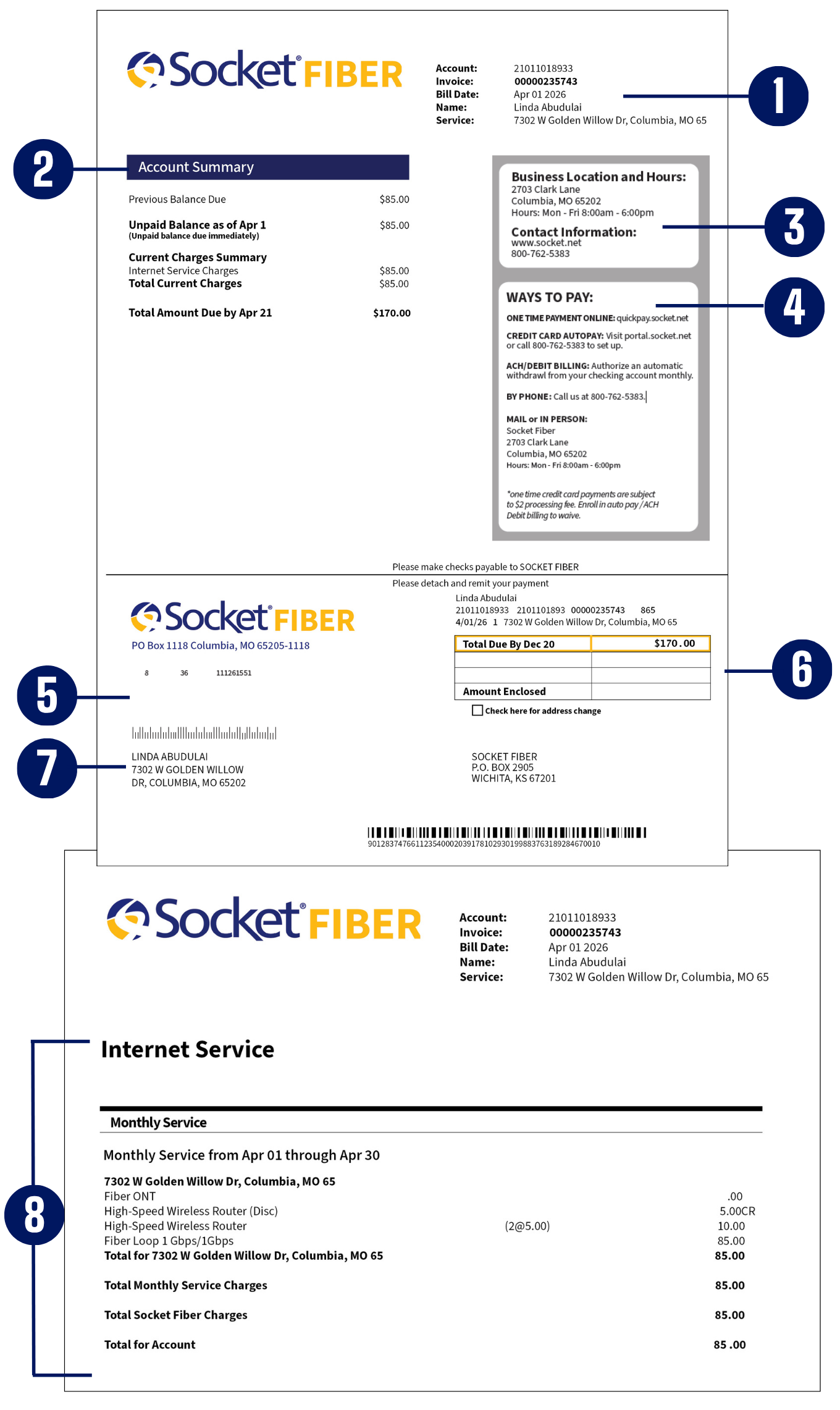
HOW TO READ YOUR BILL
We’re excited to share that we’re rolling out several improvements over the next few months designed to make your experience smoother and better than ever—including a fresh new invoice layout, an upgraded E-Care customer portal, and a faster, more convenient payment portal. These updates may bring a few changes at first, but they’ll ultimately make managing your account easier and more enjoyable.
 Customer Information – Account number, statement date, and service address.
 Account Summary – Payment amount, including current charges, any past due balances credits, and payment date.
 Contact Information – Should you need to reach us.
 Ways to Pay – Payment method options available.
 Payment Stub – Return with payment or keep for your records when paying by other methods.
 Payment Information – Payment amount to be submitted and due date.
 Customer Billing Address – Could differ from your service address.
 Account Service Summary – Breakdown of your monthly services.
introducing an Easier Way to Pay and Manage Your Monthly Bill
Socket Fiber is excited to announce the launch of an all-new bill payment system. This upgrade will provide you with a more advanced, flexible and comprehensive bill-management experience.
As a user of the previous platform, we wanted to share how this change will affect the status of any current scheduled payments within the platform, as well as other changes you can expect during this transition. Please note that the legacy payment system will no longer be active and your payment information and future scheduled payments will be securely and permanently deactivated. To authorize and schedule payments within the new system, a quick registration process is required.
FREQUENTLY ASKED QUESTIONS
What is changing?
We’re introducing a new billing and payment system along with an updated customer portal. This includes a refreshed bill layout, a more user-friendly E-Care experience, and a faster, more convenient way to make payments and manage your account.
What payment methods and payment options are available?
Customers can make payments using major credit cards, debit cards, or bank account (ACH) payments through the new payment portal.
When will the new system be implemented?
The new billing and payment system is being introduced in early June.
Will there be an interruption of online bill payment services during the update?
There may be a brief period during the transition when online payment access is unavailable. We recommend checking your account or making payments ahead of your due date when possible.
If I am a pre-existing user of the former online payment system, will I need to re-register?
You will receive an email with your new and old account number. In the email there will be a link to reset your password in the new E-Care portal.
Can I set up AutoPay from the one-time pay portal?
Yes!
Where do I find my new bill?
Your new bill will be available in the updated customer portal. You will also continue to receive notifications when your bill is ready.
Do I need to update my online banking payment information?
Yes, you will need to update your online banking payment information with the new account number.